
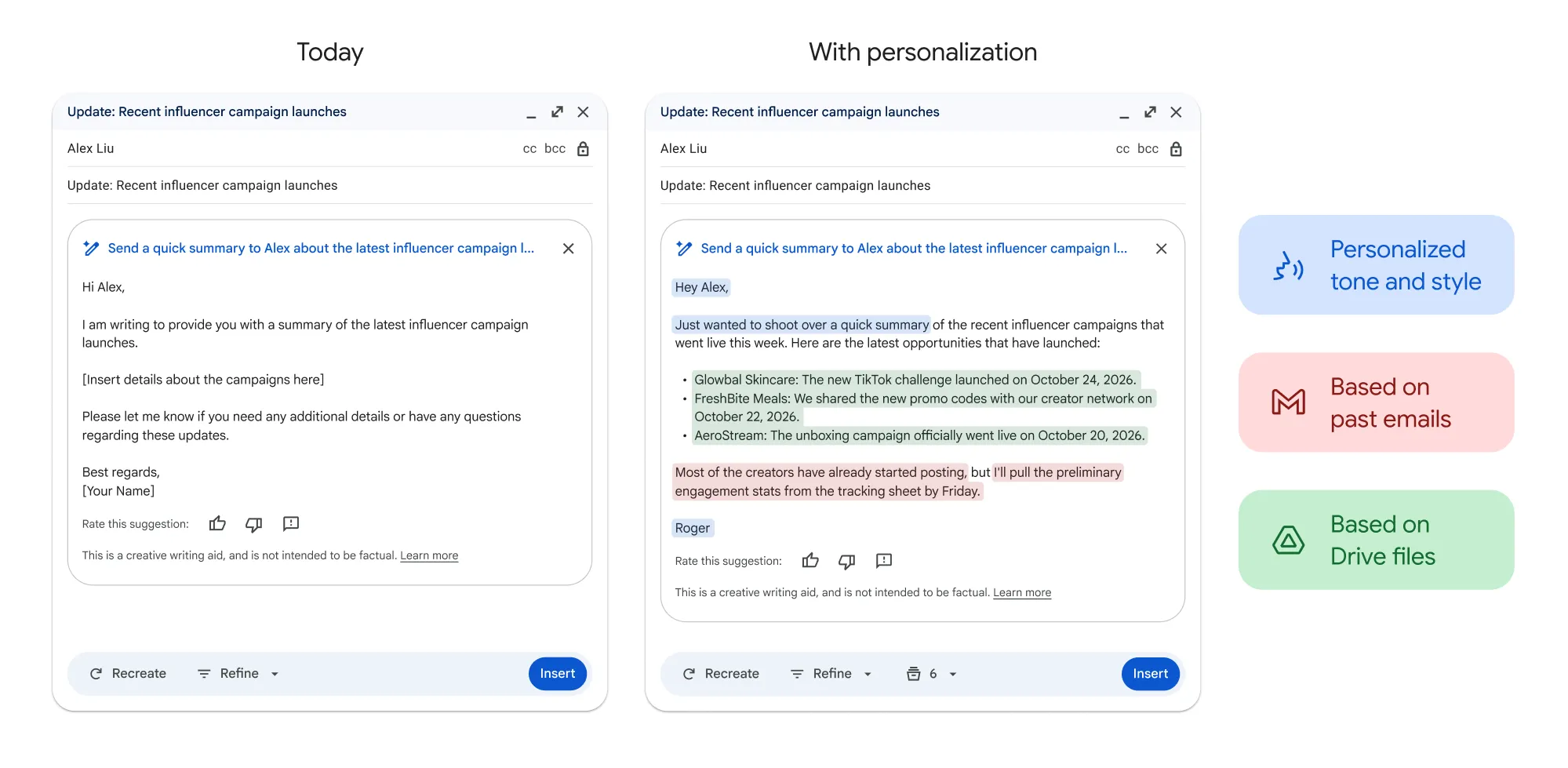

Google has expanded Gmail's Help me write feature to accept targeted follow-up instructions after an AI-generated draft is created. Instead of relying only on broad presets like Formalize, Friendly or Shorten, users can now type a specific request — for instance, asking the draft to mention a Friday deadline or add a meeting location — and Gmail will produce a revised version that can be reviewed, undone or inserted into the message.
Source and context
The publication reports the change as an extension of Gmail's existing drafting and refinement tools powered by Gemini. After a message is generated, a new instruction can be typed into the Help me write prompt bar; suggested prompts appear to guide users. Undo and Redo controls let users move between generated drafts without losing previous versions.
How the targeted editing works
Targeted prompts sit alongside the existing preset editing controls. The presets perform broad rewrites — for example, making language more formal or shorter — while a typed prompt lets the user describe one or more specific revisions. Examples the report highlights include adding a meeting time or location, mentioning an approaching deadline, making a request sound friendlier, clarifying the recipient's required action, or removing an obsolete detail.
Key takeaway
Gmail’s Help me write now accepts custom follow-up instructions so users can ask Gemini to make specific edits to an AI-generated draft — for example, adding a deadline or changing tone.
Google cautions that a targeted instruction does not guarantee other sentences remain unchanged; the entire revision should be reviewed before sending, particularly when it contains names, dates, prices or commitments.
Personalized drafts can draw from Gmail and Drive
The custom editing option follows a prior update that added context retrieval from Gmail and Google Drive and tone/style personalization based on a user's past emails. When enabled, topic contextualization can surface relevant details from recent conversations, confirmations or documents, and tone matching can model a draft on the user's previous messages. Users can view which emails and Drive files were used via a Sources control and should verify any imported information for accuracy and privacy.
3 min read
Google coverage from PhonesGATE. Published Jul 20, 2026.
Where Help me write is available
The report notes the feature appears across Gmail on desktop, Android, iPhone and iPad. Eligible Google Workspace and Google AI plans can use Help me write in multiple supported languages worldwide; personal Google Accounts currently have access limited to the United States. The Gmail and Drive personalization features are available with Google Workspace Business Starter, Standard and Plus; Workspace Enterprise Starter, Standard and Plus; Google AI Plus, Pro and Ultra; and Google AI Pro for Education. Organizational accounts require additional Workspace settings to be enabled before personalization appears.
PhonesGATE quick analysis
Targeted follow-up prompts reduce friction when a draft only needs one or two precise changes. They can be faster than regenerating a full message or manually editing small details, especially for follow-ups, scheduling notes and customer replies. The trade-off remains that AI revisions can alter other parts of a message unexpectedly, so verification remains essential.
What this means for buyers
For business users on eligible plans, the update can speed routine email tasks and improve consistency when sending many similar messages. Personal users outside the US should expect limited availability for now. Always double-check any imported context or revised wording before sending, particularly when the message includes sensitive details or commitments.
Sources and methodology
This article is based on reporting from Android Gadget Hacks, with PhonesGATE editorial context and buyer-focused analysis.